The explains everything about this airline project. This project is an Airline Reservation application project used to reserve tickets for National and International airlines.
Those who are new to java can also understand how to run this project. Here, the full details about how to run this project is explained with clear screen shots.
Set the JDK Path
You need to set the JDK path to run this program. To know how to set the path click here
Airline Reservation Complete Project
First download the complete Airline Reservation (airline.zip) Project and unzip it
Open the command prompt
Go to the path where the airline project is saved (type cd c:\...\airline in the command prompt)
Compile all the java files(type javac *.java in the command prompt)
Run the project (type java LoginPage in the command prompt)
Now the Login Page will display. Here, you can view the national and international for business and economic price list. Here, in the type in the username as demo and password as demo
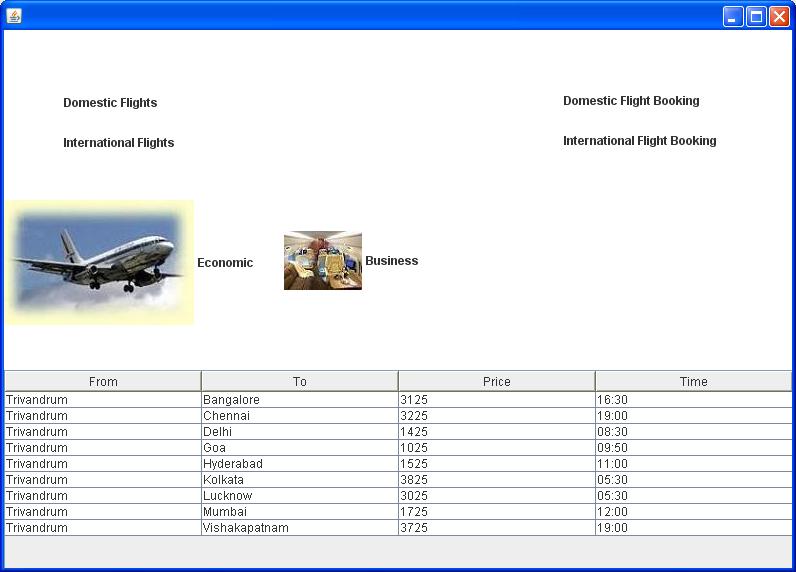
Now the Main Page will display. Here, you can view the national and international for business and economic price list. Here, you can now click Domestic Flight Booking or International Flight Booking to reserver airline tickets
Now the Reservation Form Page will display. Here, you need to type and select all the required field and click the Find Flight button. (Maximum 60 seats available in each airplane)
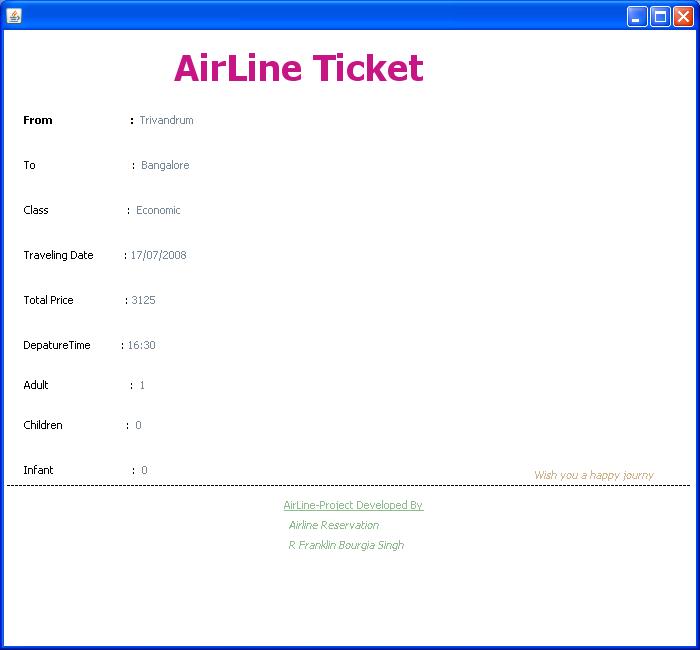
Now a dialog box will open. To conform click the Yes button
Project completed Successfully
The Abstract (or Executive Summary):
This is an important part of the document as it allows the reader to understand and see at a glance what the nature of your report is, rather than having to read the whole document. You should aim to keep this to a maximum of one page and summarize the objectives and achievements of your project. Try to give hard facts and figures, focus attentions on the conclusions of the report, help the reader remember what is in the report.




 If you like this article and/or code, make a small donation to my